
The best Neal.fun game for most players is Infinite Craft, an open-ended crafting game in which basic elements can be combined to produce increasingly unexpected discoveries.
Other strong choices include:
- Wiki Spy for visual exploration.
- Cursor Camp for a relaxed social experience.
- Sandboxels for scientific experimentation.
- Perfect Circle for a quick skill challenge.
- Asteroid Launcher for an interactive simulation.
- Stimulation Clicker for intentionally chaotic entertainment.
The right choice depends on whether the player wants a puzzle, creative tool, simulation or short distraction.
Neal.fun Games at a Glance
The play times below are editorial estimates rather than official limits. Open-ended games can last much longer depending on how deeply the player chooses to explore them.
| Rank | Neal.fun Game | Best For | Estimated Session |
| 1 | Infinite Craft | Endless crafting | 10–60+ minutes |
| 2 | Wiki Spy | Visual discovery | 5–20 minutes |
| 3 | Cursor Camp | Social exploration | 5–30 minutes |
| 4 | Sandboxels | Scientific experimentation | 10–60+ minutes |
| 5 | Constellation Draw | Creative drawing | 5–15 minutes |
| 6 | Size of Life | Educational exploration | 5–15 minutes |
| 7 | I’m Not a Robot | Puzzle challenges | 10–30 minutes |
| 8 | Internet Roadtrip | Shared online exploration | 5–30 minutes |
| 9 | Stimulation Clicker | Chaotic clicker gameplay | 10–30 minutes |
| 10 | Internet Artifacts | Internet history | 15–45 minutes |
| 11 | Space Elevator | Science visualisation | 10–20 minutes |
| 12 | Asteroid Launcher | Impact simulation | 5–20 minutes |
| 13 | Perfect Circle | Quick skill testing | 1–10 minutes |
| 14 | Wonders of Street View | Virtual sightseeing | 5–20 minutes |
| 15 | Earth Reviews | Humorous exploration | 5–15 minutes |
| 16 | Let’s Settle This | Internet debates | 5–15 minutes |
| 17 | Ambient Chaos | Sound mixing | 5–30 minutes |
| 18 | Rocks | Relaxing physics gameplay | 5–20 minutes |
| 19 | Printing Money | Scale and money visualisation | 5–10 minutes |
| 20 | Where Does the Day Go? | Time-use reflection | 10–20 minutes |
What Is Neal.fun?
Neal.fun is a collection of games, visualisations and experimental interactive websites created or hosted by developer Neal Agarwal. Its homepage describes the collection as “games, visualizations, interactives and other weird stuff”.
Agarwal describes himself as a developer interested in creative coding and building unusual digital experiences that explore what can be achieved through the web browser.
The projects do not all follow traditional game structures. Some have scores and objectives, while others are interactive toys, simulations or visual stories. Their shared appeal comes from immediate access, unusual ideas and simple controls.
How Were These Neal.fun Games Ranked?
The ranking considers four main factors:
- How quickly the experience becomes entertaining
- Originality of the central idea
- Replay value or scope for experimentation
- Suitability for a short browser-based session
The list is not based solely on difficulty or popularity. Educational projects such as Size of Life and Space Elevator are assessed alongside conventional puzzles because they still provide interactive entertainment.
What Are the Top 20 Neal.fun Games?
Neal.fun describes itself as a collection of games, visualisations, interactive projects and other unusual web experiences created or selected by Neal Agarwal. Most entries can be opened directly in a modern browser without creating an account.
The estimated session lengths below are editorial estimates, not official limits. Open-ended experiences may keep players occupied for considerably longer.
1. Infinite Craft

Infinite Craft is an open-ended sandbox crafting game developed by Neal Agarwal. Players begin with Water, Fire, Wind and Earth, combining two elements at a time to generate new objects, people, places, creatures and concepts.
Generative AI helps determine previously unknown combinations, which explains why some results are sensible while others are surprising or absurd. A player who creates a previously undiscovered element may receive a First Discovery label.
The game has no traditional campaign or final objective. Players can instead set personal challenges, such as creating a favourite film, country, celebrity, animal or fictional character.
| Infinite Craft Information | Details |
| Developer | Neal Agarwal |
| Publisher | Neal.fun and Neal Agarwal |
| Platforms | Web browser, iOS and Android |
| Genre | Sandbox, crafting and puzzle |
| Game mode | Single-player |
| Starting elements | Water, Fire, Wind and Earth |
| Main mechanic | Combining two elements |
| Account required | No account required for browser play |
| Official source | Play Infinite Craft |
How Is Infinite Craft Played?
- The player opens the game and selects a starting element.
- One element is dragged onto another.
- The newly created result is added to the discoveries list.
- The new element can then be combined with another item.
- Players can use the search box to locate previous discoveries.
- Unwanted items can be removed from the active workspace.
What Are the Rules?
- Two elements are normally required for each crafting attempt.
- Discovered items are not consumed when reused.
- The same pair usually produces the same result.
- There is no time limit or required finishing point.
- First Discovery labels identify unusually rare creations.
- Clearing the workspace does not necessarily remove saved discoveries.
Who Is Infinite Craft Recommended For?
Infinite Craft is recommended for crafting-game fans, creative players, puzzle enthusiasts and anyone who enjoys unpredictable experimentation.
Estimated session length: 10 minutes to several hours.
2. Wiki Spy
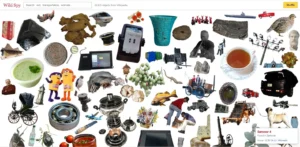
Wiki Spy is an endless visual-search experience built from objects taken from Wikipedia images. It resembles an enormous digital I-Spy collage in which photographs and illustrations are isolated from their original backgrounds and placed together.
Players can search by colour or concept using terms such as “red”, “transportation” or “animals”. Selecting an object leads towards visually similar material, while the Wikipedia option provides access to further information about the selected subject.
Unlike an ordinary search engine, Wiki Spy encourages wandering and discovery rather than returning a conventional list of results.
| Wiki Spy Information | Details |
| Creator | Neal Agarwal |
| Publisher | Neal.fun |
| Platform | Web browser |
| Genre | Visual search and I-Spy exploration |
| Game mode | Single-player |
| Content source | Objects from Wikipedia images |
| Main controls | Search, select, shuffle and clear |
| Winning condition | None |
| Official source | Explore Wiki Spy |
How Is Wiki Spy Played?
- The player opens the visual collage.
- A concept, object or colour is entered in the search box.
- The player examines the resulting collection.
- An interesting object can be selected.
- Similar objects can then be explored.
- The shuffle button produces another arrangement.
- The Wikipedia link can be used for further reading.
What Are the Rules?
- Search terms should describe a colour, category or visible concept.
- There is no score, timer or final level.
- Selecting an image helps continue the visual discovery process.
- The shuffle control changes the displayed material.
- Wikipedia content may change as articles and images are updated.
Who Is Wiki Spy Recommended For?
Wiki Spy is recommended for visual learners, hidden-object fans, Wikipedia readers, pupils and people who enjoy unusual internet rabbit holes.
Estimated session length: 5–30 minutes.
3. Cursor Camp
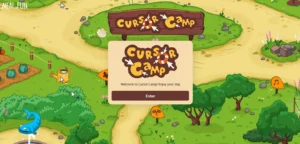
Cursor Camp is a multiplayer social playground in which the mouse cursor becomes the player’s character. Visitors enter a large virtual camp where they can move between areas, interact with objects and encounter cursors controlled by other people.
The game avoids a conventional avatar-creation process. Movement happens naturally through the mouse or trackpad, making the computer pointer part of the game world.
Activities and secrets are distributed around the camp, encouraging exploration rather than competition. The social interaction is largely based on movement and shared activities instead of conventional open chat.
| Cursor Camp Information | Details |
| Developer | Neal Agarwal |
| Publisher | Neal.fun |
| Primary platform | Desktop web browser |
| Genre | Multiplayer social sandbox |
| Game mode | Online multiplayer |
| Player character | Mouse cursor |
| Main mechanic | Exploration and environmental interaction |
| Competitive scoring | Not the main focus |
| Official source | Enter Cursor Camp |
How Is Cursor Camp Played?
- The player opens the game on a desktop or laptop.
- The Enter button opens the shared camp.
- Moving the mouse moves the cursor character.
- The player explores buildings, outdoor areas and activity zones.
- Interactive objects can be selected or moved.
- Other players can be followed or joined in informal activities.
- Hidden objects and achievements can be discovered through exploration.
What Are the Rules?
- Each visitor controls an individual cursor.
- Participants share the same online space.
- The game does not require defeating other players.
- Certain activities depend on mouse movement and clicking.
- The experience may differ according to how many players are present.
- Other cursors should be treated as real participants.
Who Is Cursor Camp Recommended For?
Cursor Camp is recommended for desktop users, social-game fans and players who enjoy relaxed multiplayer spaces without complex controls.
Estimated session length: 10–45 minutes.
4. Sandboxels
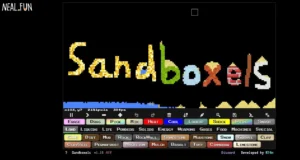
Sandboxels is a detailed falling-sand and pixel-physics simulation developed by R74n. Players draw materials onto a canvas and observe how they fall, flow, burn, freeze, grow, melt or react.
Its extensive element library includes gases, liquids, powders, foods, plants, weather effects, tools and fictional substances. Players can construct ecosystems, create machines, test reactions or cause large-scale destruction.
The simulator includes pause, undo, redo, temperature, save, mod and offline-installation controls. The official page credits R74n as the developer.
| Sandboxels Information | Details |
| Developer | R74n |
| Host and publishing partner | Neal.fun |
| Platforms | Web browser, offline web installation and Steam |
| Genre | Falling-sand sandbox and physics simulation |
| Game mode | Primarily single-player |
| Main mechanic | Drawing and interacting with simulated materials |
| Mod support | Available |
| Save options | Local and file-based options |
| Official source | Play Sandboxels |
How Is Sandboxels Played?
- The player selects an element from the available categories.
- The material is drawn onto the canvas.
- Another substance is added nearby.
- The simulation shows how the materials interact.
- Heat, cooling or mixing tools can be applied.
- The game can be paused while a structure is built.
- Experiments can be saved or reset.
A simple experiment could involve placing water below sand, adding plants and introducing fire to observe how the scene changes.
What Are the Rules?
- Each pixel represents a material or element.
- Gravity affects suitable powders and liquids.
- Materials have different temperatures and densities.
- Heat can ignite, melt or evaporate some substances.
- Cooling can freeze or solidify suitable elements.
- Resetting clears the active canvas.
- Fictional elements should not be treated as accurate scientific models.
Who Is Sandboxels Recommended For?
Sandboxels is recommended for science enthusiasts, creative builders, physics-game fans and players who want an open-ended experience with substantial replay value.
Estimated session length: 15 minutes to several hours.
5. Constellation Draw
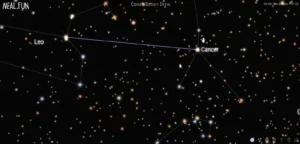
Constellation Draw is a creative astronomy-inspired activity in which players connect stars to form original constellations.
The game provides a field of stars rather than a blank drawing canvas. Players must therefore find shapes within an existing arrangement of points. Completed patterns can be named, viewed as part of a personal night sky, cleared or shared.
The official interface instructs players to select two stars to connect them and includes controls for names, saved constellations and sharing.
| Constellation Draw Information | Details |
| Creator | Neal Agarwal |
| Publisher | Neal.fun |
| Platform | Web browser |
| Genre | Creative drawing and astronomy interactive |
| Game mode | Single-player |
| Main mechanic | Connecting pairs of stars |
| Creative tools | Name, clear, view and share |
| Scoring system | None |
| Official source | Use Constellation Draw |
How Is Constellation Draw Played?
- The player selects one star.
- A second star is selected to create a line.
- Additional stars are connected to develop a recognisable pattern.
- The completed constellation can be named.
- The player can view it within the personalised night sky.
- The creation can be shared or cleared.
What Are the Rules?
- Lines must connect visible stars.
- Two stars are needed for each line.
- Players can create representational or abstract shapes.
- There is no correct constellation.
- A drawing does not need to match an officially recognised star pattern.
- Clearing the page removes the active designs.
Who Is Constellation Draw Recommended For?
Constellation Draw is recommended for creative players, families, astronomy enthusiasts, pupils and anyone seeking a calm browser activity.
Estimated session length: 5–20 minutes.
6. Size of Life

Size of Life is an educational visualisation that compares the scale of living things, moving from microscopic organisms towards extremely large plants and animals.
The project was created by Neal Agarwal and features illustrations by natural-history artist Julius Csotonyi. Its visual sequence helps users understand differences that are difficult to appreciate through measurements alone.
Instead of displaying organisms in an ordinary list, the experience gradually changes scale, allowing the viewer to compare small biological structures with larger forms of life.
| Size of Life Information | Details |
| Creator | Neal Agarwal |
| Illustrator | Julius Csotonyi |
| Publisher | Neal.fun |
| Platform | Web browser |
| Genre | Educational biology visualisation |
| Game mode | Single-user exploration |
| Main subject | Comparative scale of living things |
| Scoring system | None |
| Official source | Explore Size of Life |
How Is Size of Life Used?
- The visitor selects Enter.
- The experience begins with a small biological subject.
- The user moves through the sequence.
- Each illustration is compared with surrounding examples.
- Measurements and supporting information can be examined.
- The journey continues towards progressively larger forms of life.
What Are the Rules?
- The project is designed for guided exploration rather than competition.
- Users move through the subjects in the intended sequence.
- Measurements should be read alongside the illustrations.
- Individual organisms may vary in size.
- The project should not replace formal scientific reference material.
- There is no winning or losing condition.
Who Is Size of Life Recommended For?
Size of Life is recommended for biology learners, teachers, pupils, natural-history fans and visual learners.
Estimated session length: 10–25 minutes.
7. I’m Not a Robot

I’m Not a Robot is a puzzle game that transforms familiar CAPTCHA verification tests into an increasingly unusual sequence of challenges.
The game begins with a simple checkbox before moving towards image selection, observation, movement, text and logic puzzles. Each stage parodies the frustrating security tests frequently encountered on websites.
The official page identifies the opening challenge as “Level 1: Checkbox” and credits the game as being made by Neal.
| I’m Not a Robot Information | Details |
| Developer | Neal Agarwal |
| Publisher | Neal.fun |
| Primary platform | Web browser |
| Genre | Puzzle and CAPTCHA parody |
| Game mode | Single-player |
| Structure | Sequential levels |
| Main skills | Observation, logic and pointer control |
| Genuine security tool | No |
| Official source | Play I’m Not a Robot |
How Is I’m Not a Robot Played?
- The player completes the opening checkbox.
- The instruction for the next verification task is read carefully.
- Relevant images, words or objects are selected.
- The answer is submitted.
- Incorrect responses can be attempted again.
- Completing a puzzle opens the next level.
- The process continues as the tests become more complicated.
What Are the Rules?
- Each level must be solved before the next becomes available.
- The exact instruction on screen must be followed.
- Some puzzles require precision rather than speed.
- Incorrect answers may restart or repeat a stage.
- There is generally a required solution for each level.
- The game does not provide genuine CAPTCHA security.
Who Is I’m Not a Robot Recommended For?
The game is recommended for puzzle fans, players who enjoy escalating challenges and anyone familiar with the frustrations of online verification.
Estimated session length: 15–60 minutes.
8. Internet Roadtrip
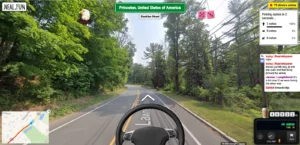
Internet Roadtrip is a collaborative online social experiment built around Google Street View. Participants collectively control a virtual vehicle by voting on its next action.
Players can vote on the direction of travel, ask the vehicle to honk or request a radio change. The option receiving the most support determines the next action, meaning that no individual participant controls the complete journey.
The interface includes Street View imagery, a map, a radio, a driver count and shared voting controls.
| Internet Roadtrip Information | Details |
| Creator | Neal Agarwal |
| Publisher | Neal.fun |
| Platform | Web browser |
| Mapping service | Google Street View |
| Genre | Social experiment and road-trip simulator |
| Game mode | Online community participation |
| Main mechanic | Collective voting |
| Individual control | Limited |
| Official source | Join Internet Roadtrip |
How Is Internet Roadtrip Played?
- The participant opens the live journey.
- The current Street View location is examined.
- Available directions or actions are presented.
- The participant selects one option.
- The community vote is counted.
- The most popular choice controls the next movement.
- The process repeats at the new position.
What Are the Rules?
- Each participant votes during the available voting window.
- The majority choice determines the action.
- Players can vote for directions, the horn or radio controls.
- No individual participant has permanent control.
- Travel depends on available Google Street View connections.
- The journey continues when individual visitors leave.
Who Is Internet Roadtrip Recommended For?
Internet Roadtrip is recommended for geography enthusiasts, collaborative-game fans and people interested in large online social experiments.
Estimated session length: 5–30 minutes per visit.
9. Stimulation Clicker

Stimulation Clicker is an incremental clicker game that begins with one simple button. Pressing it produces stimulation points, which can be exchanged for upgrades.
As progress continues, additional sounds, animations, videos and distractions occupy the screen. What starts as a minimal clicking activity gradually becomes a parody of overstimulating online content.
The official interface displays a stimulation total, a central Click Me button and an upgrade system.
| Stimulation Clicker Information | Details |
| Developer | Neal Agarwal |
| Publisher | Neal.fun |
| Platform | Web browser |
| Genre | Incremental clicker and internet satire |
| Game mode | Single-player |
| In-game resource | Stimulation points |
| Main mechanic | Clicking and buying upgrades |
| Audio and visual intensity | Increases during play |
| Official source | Play Stimulation Clicker |
How Is Stimulation Clicker Played?
- The player presses the main button.
- Each click produces stimulation points.
- Available upgrades are purchased.
- Some upgrades increase point production.
- Other upgrades add distracting screen elements.
- The process continues as more options become available.
- The player attempts to manage the increasingly crowded interface.
What Are the Rules?
- Stimulation points function as the game’s currency.
- Upgrades require a specified number of points.
- More advanced upgrades appear progressively.
- Automatic point production may become available.
- There is no penalty for pausing or leaving.
- The visual and audio intensity is intentional.
Who Is Stimulation Clicker Recommended For?
It is recommended for incremental-game fans and players who enjoy internet satire. It may be unsuitable for people sensitive to loud, layered or visually intense content.
Estimated session length: 15–45 minutes.
10. Internet Artifacts
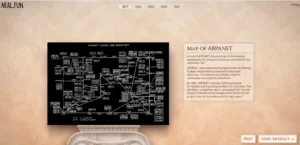
Internet Artifacts is an interactive museum exploring notable moments, technologies, websites and communities from internet history.
The collection includes material relating to ARPANET, email, online slang, Usenet, early websites, webcams, GeoCities, search engines, social networks, memes and browser games.
Website snapshots and preserved Flash files are credited to the Internet Archive. The project also presents an extensive source list for its historical exhibits.
| Internet Artifacts Information | Details |
| Creator | Neal Agarwal |
| Publisher | Neal.fun |
| Platform | Web browser |
| Genre | Interactive museum and technology history |
| Game mode | Single-user exploration |
| Main subject | Internet history and digital culture |
| Archive material | Internet Archive snapshots and files |
| Sources provided | Yes |
| Official source | Visit Internet Artifacts |
How Is Internet Artifacts Explored?
- The visitor opens the first exhibit.
- Its description and historical context are read.
- Preserved images, files or recreations can be examined.
- The next control moves to another artefact.
- Previous exhibits can be revisited.
- Supporting sources can be opened for further research.
What Are the Rules?
- Exhibits are intended to be explored in sequence.
- Users can move forwards or backwards.
- Some preserved elements may be interactive.
- External source links provide additional evidence.
- There is no score or required completion time.
- Individual browser settings may affect archived content.
Who Is Internet Artifacts Recommended For?
Internet Artifacts is recommended for technology enthusiasts, web developers, pupils, teachers and anyone interested in early online culture.
Estimated session length: 20–60 minutes.
11. Space Elevator
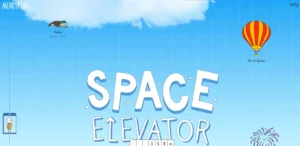
Space Elevator takes the visitor on a vertical journey from ground level to the boundary commonly associated with outer space.
As the page moves upwards, it compares the heights of birds, mountains, clouds, aircraft, balloons, meteors, rockets and atmospheric events. Altitude and temperature indicators help place each subject in context.
The journey passes through the troposphere, stratosphere, mesosphere and thermosphere before reaching the Kármán line at approximately 100 kilometres above Earth.
| Space Elevator Information | Details |
| Creator | Neal Agarwal |
| Additional artwork | Birds and aircraft by Cindy Nhi |
| Publisher | Neal.fun |
| Platform | Web browser |
| Genre | Educational space and atmosphere visualisation |
| Game mode | Single-user exploration |
| Main control | Vertical scrolling |
| Final destination | Kármán line |
| Official source | Ride the Space Elevator |
How Is Space Elevator Used?
- The visitor begins at ground level.
- Scrolling upwards increases the altitude.
- The temperature and height indicators are monitored.
- Entries about animals, aircraft and atmospheric events are read.
- The user continues through each atmospheric layer.
- The journey finishes at the recognised boundary of space.
What Are the Rules?
- Scrolling controls the journey.
- Users may stop to inspect any entry.
- Scrolling down returns to earlier sections.
- The project has no points, lives or failure state.
- Scientific measurements are simplified for visual communication.
- The Kármán line is presented as the commonly accepted boundary of space.
Who Is Space Elevator Recommended For?
Space Elevator is recommended for astronomy fans, pupils, science teachers, aircraft enthusiasts and visual learners.
Estimated session length: 10–25 minutes.
12. Asteroid Launcher

Asteroid Launcher is an interactive impact simulator that allows users to select a location and calculate the possible consequences of a simulated asteroid strike.
Players can adjust the asteroid’s composition, diameter, speed and impact angle. The resulting model may show the estimated crater, fireball, shockwave, wind and seismic effects.
The official interface provides default values for diameter, speed and angle, together with an interactive impact-location selector and metric or imperial measurements.
| Asteroid Launcher Information | Details |
| Creator | Neal Agarwal |
| Publisher | Neal.fun |
| Platform | Web browser |
| Genre | Scientific impact simulator |
| Game mode | Single-user simulation |
| Adjustable inputs | Material, diameter, speed and angle |
| Location control | Interactive map |
| Measurement systems | Metric and imperial |
| Official source | Use Asteroid Launcher |
How Is Asteroid Launcher Used?
- The user selects the asteroid material.
- Its diameter is adjusted.
- The impact speed is chosen.
- The impact angle is set.
- A location is selected on the map.
- The launch button begins the simulation.
- Each estimated effect can then be examined.
- Inputs can be changed for comparison.
What Are the Rules?
- An impact location must be selected.
- Larger or faster objects generally produce more energy.
- Impact angle can affect the simulated outcome.
- Results depend entirely on the selected inputs.
- The simulator provides estimates rather than exact predictions.
- It should not be used for emergency or scientific planning.
Who Is Asteroid Launcher Recommended For?
Asteroid Launcher is recommended for space enthusiasts, geography learners, science pupils and fans of interactive disaster simulations.
Estimated session length: 5–30 minutes.
13. Perfect Circle
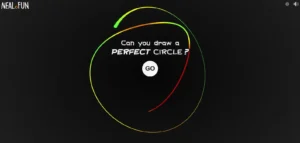
Perfect Circle is a short precision game that asks the player to draw a circle around a central point.
After the player completes the shape, the game provides a percentage reflecting how closely the drawing resembles a perfect circle. Each attempt takes only a few seconds, encouraging repeated efforts to improve the score.
The official page presents a Go button, a central guide and a percentage result.
| Perfect Circle Information | Details |
| Creator | Neal Agarwal |
| Publisher | Neal.fun |
| Platforms | Desktop and mobile web browsers |
| Genre | Drawing and precision challenge |
| Game mode | Single-player |
| Main input | Mouse, trackpad, touchscreen or stylus |
| Scoring system | Percentage accuracy |
| Attempt limit | None |
| Official source | Play Perfect Circle |
How Is Perfect Circle Played?
- The player selects Go.
- The pointer is positioned near the central guide.
- The mouse button or touchscreen is held down.
- One continuous circle is drawn.
- The line returns close to its starting point.
- Releasing the input completes the attempt.
- The displayed percentage can be improved through another attempt.
What Are the Rules?
- The circle should surround the central point.
- One continuous stroke should be used.
- The shape should be smooth and symmetrical.
- The end should meet the approximate starting position.
- There is no limit on retries.
- The score is an entertainment feature, not a professional measurement.
Who Is Perfect Circle Recommended For?
Perfect Circle is recommended for quick competitions, digital artists, casual players and anyone seeking a browser challenge that can be completed in under a minute.
Estimated session length: 1–10 minutes.
14. Wonders of Street View

Wonders of Street View presents a curated selection of strange, amusing and visually unusual locations captured through Google Street View.
The collection includes unexpected buildings, costumes, landscapes, objects and image-stitching effects. Users can explore each scene in 360 degrees before selecting the random control to move to another discovery.
The official description invites users to explore the “weird and wonderful” side of Street View.
| Wonders of Street View Information | Details |
| Creator | Neal Agarwal |
| Publisher | Neal.fun |
| Platform | Web browser |
| Image service | Google Street View |
| Genre | Virtual sightseeing and curated exploration |
| Game mode | Single-user browsing |
| Main control | Random location selector |
| Winning condition | None |
| Official source | Explore Wonders of Street View |
How Is Wonders of Street View Used?
- The first location is allowed to load.
- The user moves the camera around the scene.
- Interesting details can be enlarged.
- Nearby Street View positions may be explored.
- The random button loads another location.
- Friends can attempt to identify the country or explain the scene.
What Are the Rules?
- Each scene is based on Google Street View imagery.
- Movement depends on available Street View coverage.
- Some visual oddities result from image stitching.
- Underlying imagery may be replaced by Google.
- Real people and properties should be treated respectfully.
- The activity has no score or fixed ending.
Who Is Wonders of Street View Recommended For?
It is recommended for virtual travellers, geography fans, unusual-photography enthusiasts and players seeking a relaxed exploration experience.
Estimated session length: 5–30 minutes.
15. Earth Reviews

Earth Reviews imagines that Earth is a simulation and its creators are asking users to review its features.
Visitors can rate everyday subjects such as books, rivers, animals, emotions, weather and activities. Each listing presents an average star score, a short simulation-themed description and reviews written by users.
The humour comes from describing ordinary life through the language of video-game updates, non-player characters, bugs, character statistics and simulation features.
| Earth Reviews Information | Details |
| Creator | Neal Agarwal |
| Publisher | Neal.fun |
| Platform | Web browser |
| Genre | Comedy, ratings and community interaction |
| Game mode | Individual browsing with public contributions |
| Rating system | Five stars |
| Main mechanic | Reading, rating and reviewing |
| User-generated content | Yes |
| Official source | Browse Earth Reviews |
How Is Earth Reviews Used?
- The visitor selects an object, animal, activity or experience.
- Its description and average rating are reviewed.
- Existing comments can be sorted or read.
- The visitor selects a star rating.
- A short review can be written.
- Related subjects can be opened for further browsing.
What Are the Rules?
- Reviews should relate to the selected subject.
- Personal or private information should not be posted.
- Harassment and offensive submissions should be avoided.
- Public ratings are not scientific surveys.
- User comments should not be treated as expert advice.
- Publicly submitted material may not be suitable for every age group.
Who Is Earth Reviews Recommended For?
Earth Reviews is recommended for internet-humour fans, creative writers and people who enjoy reading unusual community comments.
Estimated session length: 5–30 minutes.
16. Let’s Settle This

Let’s Settle This asks visitors to vote on familiar internet debates.
Questions cover topics such as whether cereal is soup, whether a hot dog is a sandwich, how “GIF” should be pronounced, whether pineapple belongs on pizza and whether a sandwich should be cut diagonally.
After selecting one of two answers, the user can compare the choice with the accumulated vote.
| Let’s Settle This Information | Details |
| Creator | Neal Agarwal |
| Publisher | Neal.fun |
| Platform | Web browser |
| Genre | Voting game and social experiment |
| Game mode | Individual voting with aggregated results |
| Question format | Two-option debates |
| Results | Percentages and vote totals |
| Scientific polling | No |
| Official source | Vote on Let’s Settle This |
How Is Let’s Settle This Played?
- The visitor reads a debate question.
- One of the two answers is selected.
- The result is revealed.
- The visitor compares the personal answer with the majority.
- The next debate is answered.
- Friends can discuss why they chose differently.
What Are the Rules?
- Each question provides two choices.
- One answer must be selected before the result appears.
- Most questions have no objectively correct answer.
- There is no overall winning score.
- Results reflect voluntary website visitors.
- Percentages should not be treated as representative polling.
Who Is Let’s Settle This Recommended For?
It is recommended for groups, families, classrooms and friends seeking light discussion questions and harmless debates.
Estimated session length: 5–15 minutes.
17. Ambient Chaos

Ambient Chaos is an interactive audio mixer that allows users to combine peaceful environmental sounds with increasingly disruptive noises.
Calmer options include rain, waves, a campfire, wind, a forest, lo-fi beats and a coffee shop. Other choices include construction, fireworks, a haunted dungeon, an alien ship, a volcano, a zombie invasion and a nuclear siren.
Each sound has its own level control, allowing the user to build a quiet soundscape or an intentionally chaotic mixture.
| Ambient Chaos Information | Details |
| Creator | Neal Agarwal |
| Publisher | Neal.fun |
| Platform | Web browser with audio |
| Genre | Ambient sound mixer and audio toy |
| Game mode | Single-user |
| Main mechanic | Layering independently controlled sounds |
| Sound categories | Natural, urban, social and fictional |
| Scoring system | None |
| Official source | Use Ambient Chaos |
How Is Ambient Chaos Used?
- The device volume is set to a moderate level.
- One background sound is increased.
- A compatible second sound is introduced.
- Individual levels are adjusted.
- More environmental noises can be added.
- Chaotic sounds may be introduced for comic effect.
- Unwanted layers can be reduced or removed.
What Are the Rules?
- Every sound can be adjusted independently.
- Multiple tracks can play simultaneously.
- No sounds need to be unlocked.
- There is no required final mixture.
- Device and browser volume affect the result.
- Headphone users should increase levels cautiously.
Who Is Ambient Chaos Recommended For?
Ambient Chaos is recommended for sound-design fans, background-noise listeners and users who enjoy creating humorous audio combinations.
Estimated session length: 5–30 minutes.
18. Rocks

Rocks is a minimalist physics game in which the player attempts to balance four irregular virtual rocks.
The game begins with the stones falling into the scene. Each one can be picked up, moved and placed on another. The challenge comes from finding stable contact points while accounting for the shape and weight of every rock.
There is no score or written tutorial. Players learn by observing the simulated movement and rebuilding the stack after it collapses.
| Rocks Information | Details |
| Creator | Neal Agarwal |
| Publisher | Neal.fun |
| Platform | Web browser |
| Genre | Physics, balancing and relaxation |
| Game mode | Single-player |
| Main objects | Four virtual rocks |
| Primary objective | Create a stable stack |
| Scoring system | None |
| Official source | Play Rocks |
How Is Rocks Played?
- The player selects a broad rock for the base.
- It is positioned securely on the ground.
- A second rock is picked up.
- Its angle is adjusted to find a stable contact point.
- The rock is lowered carefully.
- The remaining stones are added.
- The finished tower is observed to see whether it remains standing.
What Are the Rules?
- Rocks respond to simulated gravity.
- Every stone must be supported.
- Unstable placements will slide or fall.
- Rocks may be stacked in any order.
- A fallen tower can be rebuilt immediately.
- Success is informally achieved by balancing all four stones.
Who Is Rocks Recommended For?
Rocks is recommended for players who enjoy quiet physics puzzles, fine mouse control and activities without timers or competitive pressure.
Estimated session length: 5–20 minutes.
19. Printing Money

Printing Money is an animated financial-scale visualisation created by Neal Agarwal.
It compares example hourly pay with much larger revenue and spending figures. One displayed money symbol represents $1,000, allowing users to see how rapidly the screen fills as the selected financial amount grows.
The examples include different occupations, corporate revenue, NASA expenditure, US military spending and deficit growth. Users can also enter their own hourly pay.
The listed values are historical examples and should not be assumed to represent current salaries, revenues or public spending.
| Printing Money Information | Details |
| Creator | Neal Agarwal |
| Publisher | Neal.fun |
| Platform | Web browser |
| Genre | Financial-scale data visualisation |
| Game mode | Single-user interactive |
| Currency | US dollars |
| Visual unit | One symbol represents $1,000 |
| Custom input | Hourly pay |
| Official source | Explore Printing Money |
How Is Printing Money Used?
- The visitor watches the minimum-wage example.
- Different occupations are compared.
- An hourly-pay figure can be entered.
- The user scrolls towards larger financial flows.
- Corporate revenue and public spending examples are observed.
- The speed of the animated symbols helps communicate scale.
What Are the Rules?
- Each symbol represents $1,000.
- Larger amounts generate symbols more quickly.
- All figures are shown in US dollars.
- Wages, revenue, spending and deficits measure different concepts.
- The values should not be used for financial decisions.
- UK readers should not treat the figures as UK salary benchmarks.
Who Is Printing Money Recommended For?
Printing Money is recommended for data-visualisation enthusiasts, students and anyone trying to understand the scale difference between thousands, millions and billions.
Estimated session length: 5–15 minutes.
20. Where Does the Day Go?

Where Does the Day Go? is an interactive time-use visualisation that examines how work, school, sleep, commuting, meals and distractions divide a person’s day.
Users begin by estimating the large blocks in a typical routine. The experience then adds smaller activities, phone checks and the time required to refocus after interruptions.
The final visualisation demonstrates how apparently brief distractions can fragment longer periods of productive or personal time.
| Where Does the Day Go? Information | Details |
| Creator | Neal Agarwal |
| Publisher | Neal.fun |
| Platform | Web browser |
| Genre | Time-use and productivity visualisation |
| Game mode | Single-user questionnaire |
| Main inputs | Sliders and time estimates |
| Main topics | Sleep, work, commuting and distractions |
| Personalised output | Visual daily timeline |
| Official source | Use Where Does the Day Go? |
How Is Where Does the Day Go? Used?
- The user enters time spent working or studying.
- Time at home and asleep is added.
- Morning routines and meals are included.
- Commuting time is entered.
- The frequency of phone checking is estimated.
- The user selects how long it takes to refocus.
- The completed timeline shows how the day is divided.
What Are the Rules?
- The answers should describe a typical day.
- Each activity uses part of the available 24 hours.
- Interruptions divide longer blocks into smaller sections.
- Task-switching time is added after distractions.
- There is no ideal or correct result.
- The result is based on personal estimates.
- It is not a medical assessment of attention, sleep or mental health.
Who Is Where Does the Day Go? Recommended For?
It is recommended for students, office workers, remote workers and anyone interested in time management or the effects of frequent interruptions.
Estimated session length: 10–25 minutes.
Which Neal.fun Game Should Someone Play First?
A player can choose more easily by considering the type of experience they want.
For an Open-Ended Game
Start with Infinite Craft or Sandboxels. Both allow extensive experimentation and can provide much longer sessions than the other entries.
For a Five-Minute Break
Choose Perfect Circle, Earth Reviews, Rocks or Let’s Settle This. Each becomes understandable almost immediately.
For Something Educational
Try Size of Life, Space Elevator, Internet Artifacts, Asteroid Launcher or Where Does the Day Go?
For Creativity
Constellation Draw, Sandboxels and Ambient Chaos provide tools that let players produce their own visual or audio combinations.
For a Social Experience
Cursor Camp and Internet Roadtrip incorporate shared online activity. These experiences can depend on current participation and may behave differently from one visit to another.
Do Neal.fun Games Work Better on Desktop or Mobile?
Many Neal.fun projects can be opened on a mobile browser, but the quality of the experience varies.
Touch controls are generally suitable for scrolling projects such as Space Elevator and Size of Life. Infinite Craft can also work well on touch devices because its main interaction involves dragging elements.
A desktop or laptop is likely to be more comfortable for:
- Cursor Camp
- Perfect Circle
- Constellation Draw
- Sandboxels
- Rocks
- Wiki Spy
These projects benefit from a mouse, trackpad, larger display or more precise pointer control.
Browser compatibility can change, and individual projects may rely on features such as sound, local browser storage, maps or real-time online connections.
Are Neal.fun Games Free?
The listed browser projects can be opened through their official Neal.fun pages without purchasing a conventional game licence.
However, this does not necessarily mean that every Neal.fun-related product or version is free. Separate mobile applications, merchandise or third-party releases may have different terms.
Players should use official links rather than unofficial copies labelled “unblocked”, “download” or “free APK”. Unofficial versions may contain altered gameplay, aggressive advertising or unsafe downloads.
Final Takeaway
Neal.fun stands out because its projects do not follow one predictable formula. Infinite Craft offers almost endless discovery, Wiki Spy turns Wikipedia imagery into a visual search game, Sandboxels provides a detailed experimental playground, and projects such as Space Elevator make scientific scale easier to understand.
For the strongest introduction to the collection, a new visitor should begin with Infinite Craft, Wiki Spy, Perfect Circle and Space Elevator. Together, they demonstrate the combination of creativity, humour, accessibility and interactive learning that defines the Neal.fun experience.
Players should access each project through the official Neal.fun domain, treat simulation results as illustrative and use appropriate supervision when children enter shared online experiences.
FAQs
What is the most popular Neal.fun game?
Infinite Craft is among the best-known Neal.fun games because of its open-ended combination system and highly shareable discoveries. Popularity can change when new projects are released, so no fixed ranking remains accurate indefinitely.
Is Infinite Craft actually infinite?
The title describes the game’s extremely large and open-ended combination system. It should not necessarily be interpreted as a mathematical guarantee that the game contains a literally infinite number of outcomes.
Can Neal.fun games be played at school or work?
That depends on the organisation’s internet and acceptable-use policies. Some networks may block entertainment websites, online communication tools, audio or Google Street View.
Players should not attempt to bypass organisational security controls.
Does Neal.fun require an account?
Most projects open directly without presenting a central Neal.fun account-registration process. Individual features, storage behaviour or third-party services may differ between games.
Are Neal.fun games suitable for children?
Many have straightforward controls and non-violent themes, but suitability varies. Internet Roadtrip and Cursor Camp include shared online elements, while Stimulation Clicker and Ambient Chaos may be overwhelming for users sensitive to noise or intense visuals.
Can Neal.fun games be downloaded?
Most projects are designed as browser experiences. Infinite Craft also has official app listings, but users should verify the developer and publisher before installing any application claiming to be connected with Neal.fun.
Why is Neal.fun so popular?
The projects are easy to access, visually distinctive and built around ideas that can be understood quickly. They also recreate the feeling of discovering unusual independent websites rather than opening a conventional commercial gaming platform.
What game is similar to Infinite Craft on Neal.fun?
Sandboxels offers a similarly open-ended form of experimentation, although it focuses on materials and simulated physical reactions rather than combining words and concepts.
What is the best Neal.fun game for a quick break?
Perfect Circle is one of the quickest options because one attempt can be completed in less than a minute. Earth Reviews, Let’s Settle This and Rocks are also suitable for short sessions.
Note: This article has been reviewed against official Neal.fun project pages and creator information.